A brochure about cybersecurity

brochures

A printable brochure on cybersecurity aims to introduce students to the definition and importance of cybersecurity, the most common cyber threats, and how to avoid and deal with them if encountered. It also includes important information for using the internet, such as not sharing or publishing personal data, not clicking on unknown links, ensuring software and operating systems are up to date, and not sharing text messages from important accounts with strangers or friends.

In addition to encouraging students to inform their parents or teachers if they encounter a strange situation online
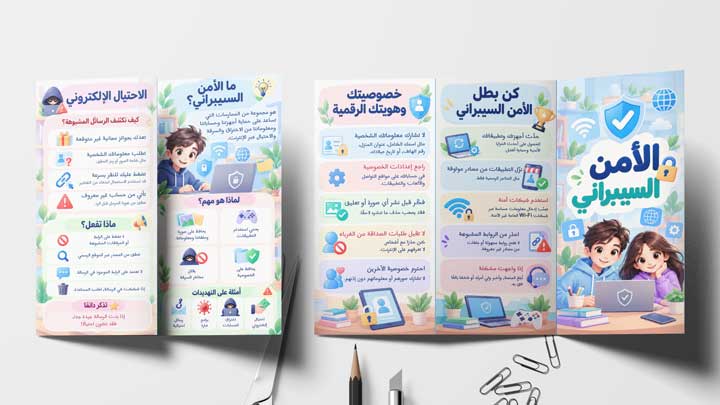
  • A brochure about cybersecurity containing the following:
    • What is cybersecurity? It is a set of behaviors to protect devices and accounts from cyberattacks.
    • The importance of cybersecurity It protects our privacy – safeguards our accounts – reduces theft
    • How to protect yourself and your online accounts Use strong and different passwords for each account – Never share your password with anyone – Enable two-factor authentication via email or phone – Download apps only from official app stores – Keep your apps and operating systems up to date – Avoid public Wi-Fi networks in restaurants and airports
    • Additional important tips
    • What is cyber fraud and how to deal with it if you are exposed to it?Avoid clicking on links from unknown sources, such as messages asking for your name and phone number or promising prizes.
    • How to maintain privacy online Do not share personal information such as name, age, and address; do not post personal photos; do not talk to strangers.
    • Steps to follow to become a cybersecurity champion
  • The template is compatible with all Office PPT versions.
  • Simplified information suitable for the target age group
  • Increasing students' awareness of the dangers of using the internet and the need to use it cautiously.
  • Raising awareness of the importance of privacy and not sharing personal information
  • Warning against talking to strangers online and promoting a culture of reporting suspicious activity to parents or teachers.
  • Helping students identify and deal with online scams
  • Helping students protect their personal accounts from hacking through clear steps
  • Brief basic tips suitable for school students' age
  • The possibility of printing the brochure and distributing it to students to increase awareness in the school.
  • Encouraging students to develop healthy habits when using the internet
  • To edit this template you will need PowerPoint. If you have Microsoft Office installed on your computer, you can find PowerPoint in the Start menu. If you don't find it, you must first purchase and install it by visiting the Microsoft website. .
  • When you open the file for the first time, you must click on “Enable Editing” when this message appears at the top of the screen in order to be able to view and edit the file .
  • Instructions for use are included with the last slide.

This template was designed by Inggez and no one has the right to republish or distribute template files or modified versions on other sites without written permission from Inggez

Similar Posts