Choosing the right font before starting to design your presentation is crucial, as using an unsuitable font can confuse the audience or give a bad impression. Therefore, always make sure to choose a font appropriate for your target audience. We'll help you with that; in this list, we've selected the best fonts with descriptions of the best presentation formats for which they can be used:
To find out the best fonts, you can watch Video If you prefer to read, you can skip the video and follow the steps below:
This list showcases the best Arabic fonts for use in PowerPoint presentations:
1- Vip Hala Line
VIP Hala font is a distinctive Arabic font created and designed by the creative designer Ghanem Al-Mutairi from Saudi Arabia, following a modern and elegant style that makes it the perfect choice for use in presentations. .
The following image shows the font in the presentation:
You can download the font by going to the website that owns the font's copyright via the following link.
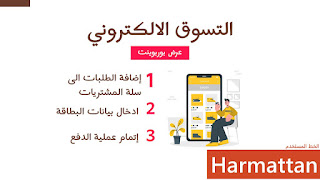
2- Harmattan line
Harmattan, named after the trade winds that blow during the winter in West Africa, provides a simplified display of Arabic text that is easy on the eyes and easy to read. This font is considered suitable for displaying to children. .
The following image shows the font in the presentation:
You can download the font by going to the website that owns the font's copyright via the following link.
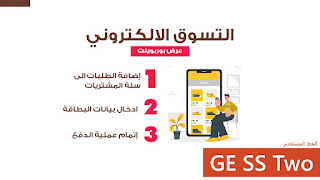
3- GE SS two line
The GSS2 font is an elegant font created and designed by Boutros, employing a modern style while respecting the conventions of Arabic calligraphy. This font is licensed under the Open Font license, allowing you to use it in your products and projects – print or digital, commercial or otherwise.
The following image shows the font in the presentation:
You can download the font by going to the website that owns the font's copyright via the following link.
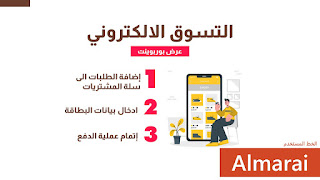
4- Almarai Line
Almarai font is a modern Arabic typeface created by Boutros™ for easy readability. The beauty of Almarai lies in its clarity and simplicity. Beneath its geometric appearance lies a strict adherence to the structure and rules of calligraphy, where each letter is meticulously crafted with attention to detail, retaining subtle hints of handwriting. These characteristics are designed to enhance the font's readability across various media, especially on screen.
The following image shows the font in the presentation:
You can download the font by going to the website that owns the font's copyright via the following link.
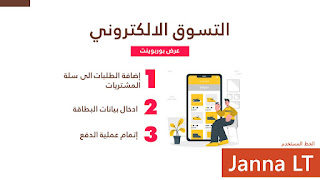
5- Jannah LT font
Jannah font is a distinctive Arabic font created and designed by Nadine Chahine and Adrian Frutiger, following a simple yet elegant and easy-to-read style, where each letter has been designed with meticulous attention to detail. .
The following image shows the font in the presentation:
You can download the font by going to the website that owns the font's copyright via the following link.
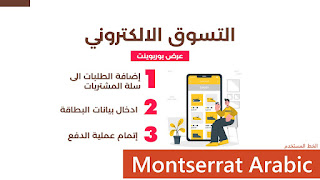
6- Montserrat Arabic font
The Montserrat Arabic font is a distinctive Arabic font created and designed by the professional designer Mohamed Gaber, following a geometric style with strict adherence to the structure and rules of the font, making it the ideal choice for use in presentations.
The following image shows the font in the presentation:
You can download the font by going to the website that owns the font's copyright via the following link.
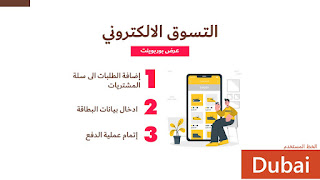
7- Dubai Line
Dubai Font is a distinctive Arabic font created and designed by Nadine Chahine and others of the Monotype Design Studio, following a simple and easy-to-read style for the public while retaining hints of handwriting. .
The following image shows the font in the presentation:
You can download the font by going to the website that owns the font's copyright via the following link.
8- Tajawal line
Tajawal is a distinctive Arabic font created and designed by Boutros™ using a modern geometric style while respecting the rules of Arabic calligraphy. Its flexibility makes it ideal for use in print and web applications, as well as with other languages. This font is licensed under the Open Font license, allowing you to use it in your products and projects – print or digital, commercial or otherwise.
The following image shows the font in the presentation:
You can download the font by going to the website that owns the font's copyright via the following link.